Studio Session: Knobs, Dials, and Compare Mode
Week 3
Competencies: Technical Understanding; Critical Analysis, Fluency, and Evaluation; Skilling and Productivity
Overview
Most of us only ever see a chat bot through its consumer front-end, where the model, temperature, thinking budget, and system prompt are all hidden. In this lab you’ll use Google AI Studio — which is free to use without an API key — to pop the hood on a model and see how the same question changes under different settings. You’ll use AI Studio’s Compare mode to run two configurations side-by-side on the same prompt.
Why AI Studio?
Unlike chat.openai.com or claude.ai, AI Studio exposes the parameters we discussed in class: temperature, thinking level, system instructions, and tools like grounded search. It’s the easiest way to feel what stochastic output and reasoning budgets actually do. You can use the default model (currently Gemini 3 Flash) without any API key or payment.
Setup
Go to aistudio.google.com and sign in with a Google account.
Open a new chat. Leave the model set to the default or select one that does not require an API key.
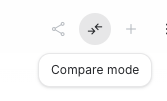
Find the Compare mode button near the top of the chat (two arrows pointing inward). This splits the view into Left and Right panels, each with their own run settings.
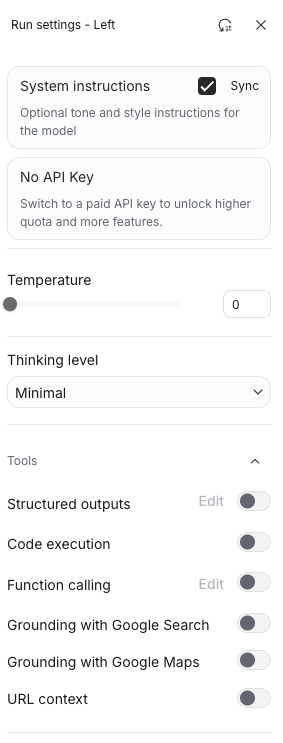
On the right side of each panel, open Run settings (the sliders icon) to access: system instructions, temperature, thinking level, and tools.
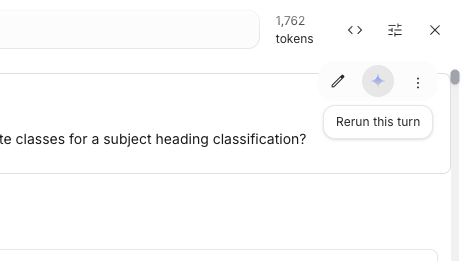
Note the Rerun this turn button — it’s the small sparkle/diamond icon that appears by the assistant’s message when you change settings. It’s easy to miss.
Example starting questions
Try experimenting with three questions. Here are some potential starting prompts: feel free to bring your own. Make sure they’re questions with room for interpretation, not a trivia lookup.
- “What is the best way to find candidate classes for a subject heading classification of a book about urban beekeeping?”
- “A patron asks for ‘that book about the octopus who paints’ — walk me through how to find it.”
- “Explain the difference between LCSH, FAST, and MeSH for a graduate student.”
- “Plan a three-day trip to a small US city for someone who likes record shops and dive bars.”
- “I want to start birdwatching near Denver. What do I actually need?”
Part 1 — Prompt Phrasing (same settings, different wording)
Keep temperature = 0 and thinking level = Minimal on both panels (this removes randomness so any differences you see come from the prompt itself, not the model’s dice roll). Ask the same question in two different ways on left and right. Examples:
- Terse vs. verbose: “Subject headings for urban beekeeping?” vs. the full sentence above.
- Neutral vs. role-framed: “Explain LCSH vs. FAST” vs. “You are a cataloging librarian. Explain…”
- Open vs. constrained: “Plan a trip…” vs. “Plan a trip in exactly 5 bullet points, under 100 words.”
Observe: one pair where phrasing changed the answer meaningfully, and one pair where it barely mattered.
Part 2 — Temperature (same prompt, different temperature)
Use your best prompt from Part 1 on both panels. Keep thinking on Minimal and set left = 0, right = 1. Hit rerun another time.
Observe: does the temperature-0 side give you the same answer every time? Does the high-temperature side get wilder — or just different? Can it go higher? Is “wilder” better or worse for your question? Obtionally tinker more with different temperature settings.
Part 3 — Thinking Level (same prompt, different reasoning budget)
Set both panels to temperature = 0. Put left on Minimal and right on High (or the highest thinking level available). Same prompt on both.
Observe: did the extra thinking actually produce a better answer, or just a slower/longer one? For which of your questions did thinking help most? Least?
Optional Explorations
Pick one if you have time:
- System instructions: add a system prompt on one side (“You are terse. You never use bullet points.” or “You are a reference librarian who always cites sources.”) and compare.
- Grounding with Google Search: toggle the tool on on one side. Does it change the answer quality? The citations? The confidence?
- Temperature at the extremes: compare temp=0 to temp=2.0 on a creative prompt. When does it become unusable?
Completion Details
Note for class discussion:
- The three test questions you used (one line each).
- One concrete observation from each of Parts 1, 2, and 3. A screenshot of a compare-mode pair is great if the contrast is striking.
- A one-or-two-sentence takeaway: which setting surprised you most, and when would you actually use that knob in real work?
Portfolio Details
Size: 1 point
Write down the observations from above, not just for discussion but for submission. Add a short “field guide” paragraph (2-4 sentences): a note to self for what you want to remember for future use. e.g. When would you reach for high temperature? Low? High thinking? Grounding?
Grading will focus on: evidence that you actually ran the comparisons and didn’t just summarize the settings; the quality of your observations about how output changed; practical insight in the field-guide reflection.