Agents
What’s Happening in AI?
Student presentation — Week 6
Administration
- AI Gallery
- High-level feedback on Portfolio Drafts
- Review of Class Goals
- Lab today?
Course Evaluations
- 10 minutes for course evaluations
Agents
An agent is anything that can be viewed as perceiving its environment through sensors and acting upon that environment through actuators.
- Russel & Norvig 1995
Agents: Core Concepts (Huyen, 2025)
- An agent is characterized by:
- The environment it operates in
- The set of actions it can perform
- AI is the “brain” that:
- Processes tasks
- Plans sequences of actions
- Determines task completion
The terminology of ‘agents’ has been muddled in AI community - there are many things that people call agents
We’ll focus on large language models that can plan the necessarily actions to complete a task, have access to one or more tools to execute those actions, and summarize or use the outputs of those actions
Exercise: Planning a Task
Tasks
- Prepare a literature review on library services for non-binary youth
- Develop a collection development plan for a graphic novel section in an academic library
- Organize a community workshop on digital privacy tools for seniors
- Create a research survey and sampling strategy to assess student information literacy skills
- Design a metadata schema for a digital collection of historical photographs
- Develop a recipe book with family favorites that accommodates dietary restrictions
- Break into small groups (3-4 people)
- Spend 5 minutes listing the specific steps you would take to complete this task
- For each step, identify:
- What information you need
- What tools or actions would be involved
- What output you expect, and how you’d combined the prior parts
- Share your approach with another group (on Zoom, ping me when you’re at this step)
- Discuss: How much of this can be approached by an AI Agent?
Agent Components
- Environment: Defines where the agent operates (web, code editor, game, etc.)
- Tools: Extend the agent’s capabilities
- Knowledge augmentation - add access to source documents, rather than relying on model’s learned nowledge (e.g. retrieval augmented execution)
- Capability extension - the things that Language Models can’t do themselves (e.g. calculator, code execution, image generation)
- Write actions (file editing, sending emails)
- Planning: The agent’s ability to reason about how to accomplish tasks
We’ve Seen Agents in Class Already
- Retrieval-Augmented Generation -> Giving an LLM access to web search, or search over your own database
- DALL-E -> Currently, GPT doesn’t generate images itself - If you ask for an image, it generates a text-to-image prompt and sends that prompt to a separate image generation tool
- Code Interpreter -> In our class about classification, we saw that you can visual your data at the end of a (e.g. our ‘sentiment classification’ exercise). There, the LLM is writing the code to visualize the data, then sending that code to a separate tool to run, then returning and interpreting the result.
The Future of Agents
- Autonomous assistants for complex tasks
- Potential to save human time despite computational costs
- Continuous improvement through:
- Better planning capabilities
- More sophisticated tools
- Enhanced security measures
The risks of agents
- Real-world harm
- Unauthorized and highly-sensitive actions (financial transactions, data deletion)
- Privacy violations through excessive data access
- Security vulnerabilities from tool misuse
- Resource depletion (lots of read/write)
- Accountability gaps (who’s responsible when agents make mistakes?)
- Amplification of existing biases in decision-making
- Unpredictable behaviors in complex environments
Agents Need More Powerful Models
- Compound mistakes: Errors multiply across multiple steps, so agents need
- 95% accuracy per step → 60% accuracy over 10 steps
- Higher stakes: With tools, agents can perform more impactful tasks
- You likely don’t want to give access to your email or bank to any machine, but especially not to a poor, error-prone model
Agent Failure Modes
- Planning failures: Incorrect reasoning, missing steps
- Tool failures: Incorrect tool selection, misuse of tools
- Efficiency issues: Too many steps, redundant actions
Limits of red teaming
Since the model has access to the internet, the external red teamers were advised to avoid prompting the model to complete tasks that could cause real-world harm. In certain cases, they created test environments—such as mock websites, databases, or emails—to safely demonstrate possible exploits. Given this constraint, their findings may not fully capture the worst-case real-world risks, but still identified key vulnerabilities that informed additional mitigations
- OpenAI - Operator System Card
Agents-lite
Code-using LLMs are a basic - but powerful - form of tool-use agent
- see ‘code interpreter’ in ChatGPT, Javascript artifacts in Claude
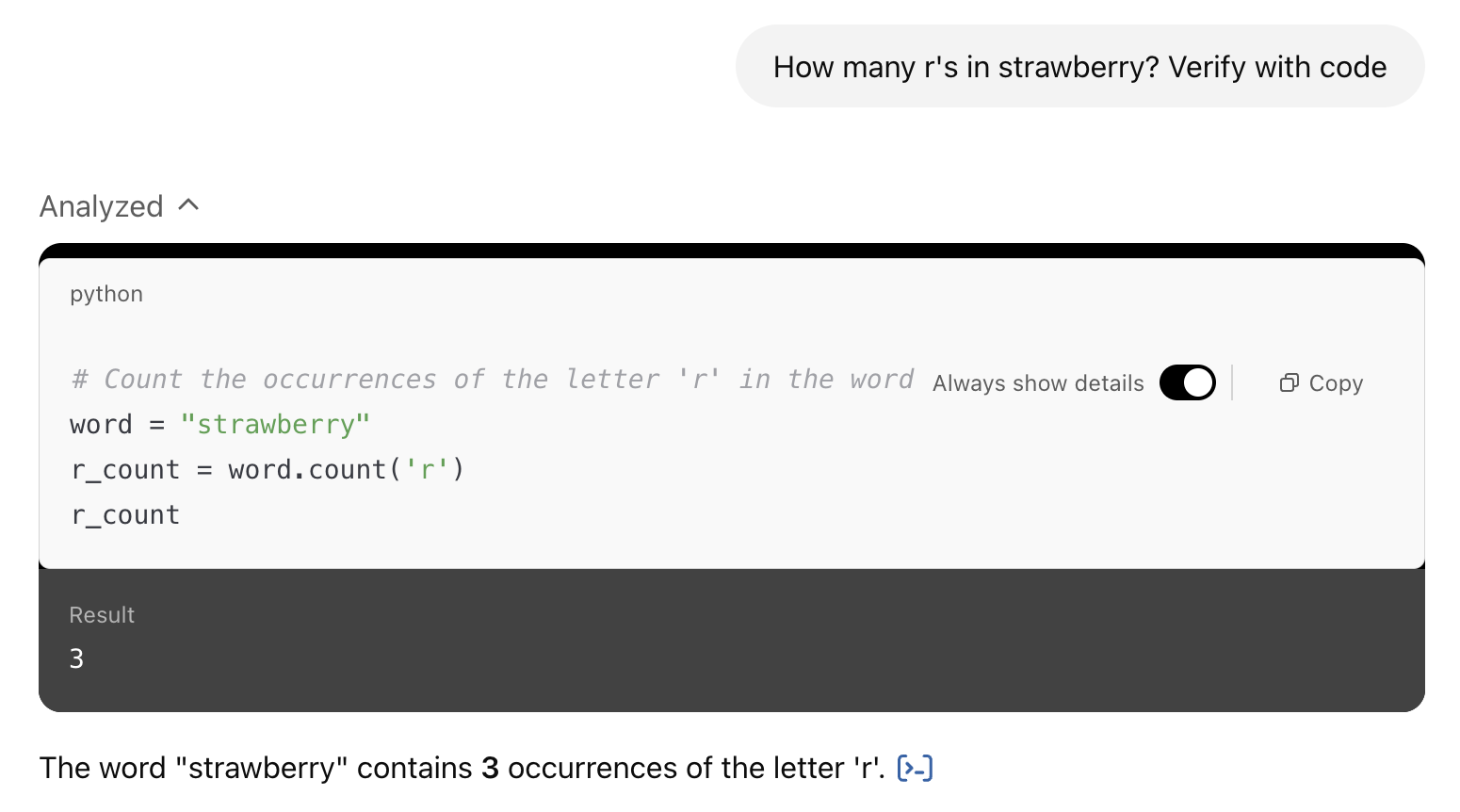
Langchain
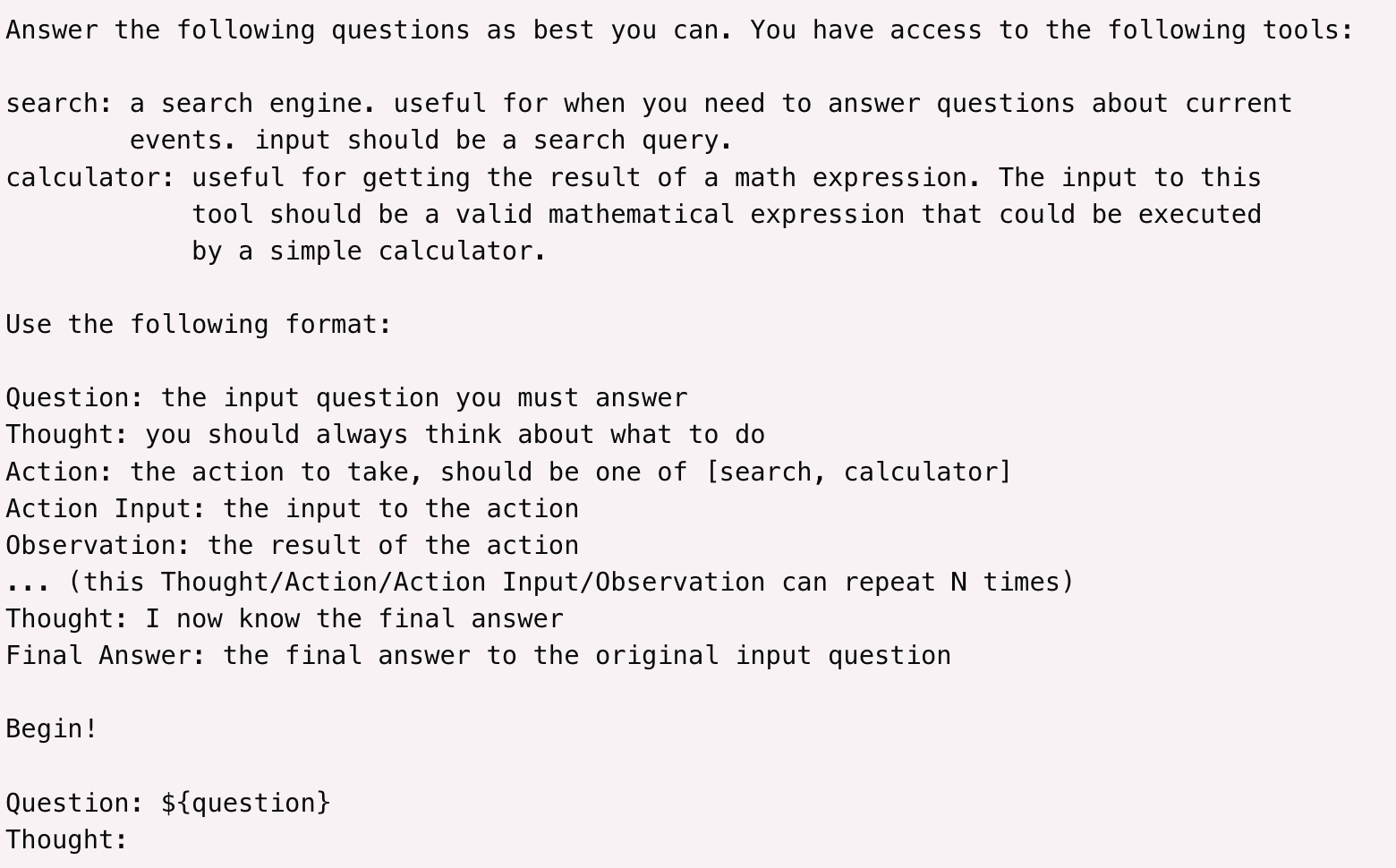
Problem: Limits to bespoke tools
Some tools are very valuable, like web search or being able to run Python code. Other tools are easy to implement, like a calculator.
But there’s a whole lot of actions you may want to do, and building a tool for each one can get challenging.
Solutions?
Computer Use

- Claude Computer Use
- OpenAI Operator
- Google Mariner
Deep Research
Claude Code
Aider
Browser Use

Coding Agents: AI That Writes, Runs, and Ships Code
From Autocomplete to Autonomy
The history of AI coding assistance has three phases:
Phase 1: Autocomplete (2021–2023)
- GitHub Copilot (2021): completes the line you’re typing
- Helpful but you drive; AI just suggests
- Works on one file at a time
Phase 2: Chat + Code (2023–2024)
- Cursor, ChatGPT Code Interpreter
- Ask questions, get whole functions
- Still mostly: you paste, you review, you run
Phase 3: Agentic Coding (2025–present)
- Claude Code, Aider, Devin
- Describe the goal; agent reads your codebase, edits files, runs tests, iterates
- Works across dozens of files
- Can commit, push, open pull requests
The difference: the AI holds the loop, not you
What Can Coding Agents Actually Do Now?
Modern agentic coding tools can:
- Read your entire codebase — not just one open file
- Edit multiple files to implement a feature end-to-end
- Run tests and fix failing ones iteratively
- Execute terminal commands (install packages, run linters, build)
- Commit code and push to GitHub
- Spawn sub-agents to work on different parts of a task in parallel
- Integrate with CI/CD — review pull requests, catch regressions
This is not science fiction — it is what Claude Code, Cursor, and Aider do in production today.
Kolterhoff, RedMonk, 2025; ikangai.com coding tools guide, 2025
The Coding Agent Landscape (2026)
| Tool | Type | Key Feature | Approx. Market Position |
|---|---|---|---|
| GitHub Copilot | IDE plugin | Autocomplete + chat; 90% of Fortune 500 | ~20M users; 42% market share |
| Cursor | AI-native IDE | Full codebase context; multi-file edits | $2B ARR; 1M+ daily active users |
| Claude Code | Terminal / CLI agent | Reads whole repo, runs commands, autonomous | $1B+ ARR; 46% “most loved” by devs |
| OpenAI Codex | Cloud agent | Async cloud tasks; parallel execution; delegates like a junior engineer | GA June 2025; ChatGPT Plus |
| Aider | CLI agent | Open-source; pairs with any LLM | Active open-source community |
| Windsurf | Agentic IDE | Full-repo Cascade agent; acquired by Cognition/Devin | Growing enterprise use |
| Devin | Autonomous agent | Designed for fully autonomous coding tasks | First “AI software engineer” |
Sources: Sacra/TechBuzz (Cursor ARR Feb 2026); Anthropic (Claude Code adoption); GitHub/Microsoft (Copilot stats, July 2025)
“Vibe Coding”
A new term for a new kind of development
What Is Vibe Coding?
“There’s a new kind of coding I call ‘vibe coding’, where you fully give in to the vibes, embrace exponentials, and forget that the code even exists.”
— Andrej Karpathy, February 2025
Coined by Karpathy (co-founder of OpenAI, former AI lead at Tesla), the term describes:
- Describing what you want in plain language
- Accepting AI-generated code without reviewing it line by line
- Relying on results and follow-up prompts to guide changes
- Iterating conversationally until the software does what you want
Collins English Dictionary Word of the Year 2025
Karpathy, X (formerly Twitter), February 2025; Collins Dictionary, 2025; Wikipedia: Vibe Coding
Vibe Coding: Opportunity and Caution
The opportunity:
- Lower barrier for people with ideas but limited coding background
- Faster prototyping even for experienced developers
- Data analysts, researchers, librarians building tools they couldn’t before
- Small one-off scripts: “parse this CSV and find duplicates”
The honest limits:
- “Not reviewing the code” creates real risk — security holes, data leaks, silent errors
- Debugging AI-generated code you don’t understand is genuinely hard
- Production software still requires engineering judgment
- The learning curve for prompting well is real — it’s a skill, not magic
For LIS students: vibe coding is most valuable for small, high-value, low-risk tasks — not for systems that handle sensitive patron data.
Claude Code: A Deep Dive
Claude Code (launched February 2025 as research preview; general availability May 2025):
- Terminal-based: runs in your project directory, reads everything
- Whole-codebase context: not just the file you have open
- Agentic loop: proposes changes → executes with approval → checks output → iterates
- CI/CD integration: can commit, push to GitHub, review pull requests
- VS Code extension: added September 2025; also web and iOS versions
Internally at Anthropic: 20% adoption on day one, 80%+ of engineers using it daily within a week of internal release.
Anthropic blog; Claude Code origin story, Panaversity/Agent Factory; Medium: Evolution of Claude Code, 2025
Claude Code in Action
Reads the codebase, proposes and implements changes, runs tests — all from the terminal
Why Did It Get Significantly Better in Late 2025?
Claude Code’s quality is tied to the underlying model:
- February 2025 — launched with Claude 3.7 Sonnet (first hybrid reasoning model; set state-of-the-art on SWE-bench for real software issues)
- May 2025 — Claude 4 (Sonnet 4 + Opus 4) released alongside Claude Code GA; Cursor called Opus 4 “a leap forward in complex codebase understanding”
- Late 2025 — Claude 4 model family matures; parallel multi-agent execution added; $1B annualized revenue reached by November 2025
The key insight: Compound reasoning matters more in agentic tasks than in single-turn chat. Each step in a multi-file refactor must be correct. Better models dramatically change what’s possible.
Anthropic: Claude 3.7 Sonnet and Claude Code (Feb 2025); Introducing Claude 4 (May 2025)
OpenAI Codex: Cloud-Based Autonomous Coding
Codex (OpenAI, May 2025 preview / June 2025 GA) — a coding agent built into ChatGPT:
- Cloud-based: runs in OpenAI-managed sandboxes — no local setup required
- Asynchronous: assign a task, come back when it’s done — like delegating to a junior engineer
- Parallel: multiple tasks can run simultaneously in separate sandboxes
- GitHub-native: reads your repo, writes code, proposes pull requests
The key contrast with Claude Code: Claude Code reasons with you in real-time in your terminal; Codex works silently in the background and surfaces results.
OpenAI: Introducing Codex, May 2025
Claude Cowork: Agents for Everyone
Claude Cowork (Anthropic, January 2026) — agentic AI without a terminal:
- Desktop agent: built into the Claude macOS app — no coding knowledge required
- Folder sandbox: designate a folder; Claude reads, creates, and edits files there
- Plain-language tasks: describe what you want; Claude plans and executes autonomously
- Computer use (March 2026): can open apps, navigate browsers, fill in forms directly on your Mac
Example tasks: “Organize my downloads folder by type and date”, “Make a spreadsheet from these receipts”, “Draft a report from these scattered notes”
Claude Code is for developers. Cowork brings the same agentic loop to information professionals — including LIS students.
Anthropic: Introducing Cowork, January 2026
Coding Agents for Information Professionals
You don’t have to be a software engineer to benefit
LIS-relevant use cases where coding agents reduce friction:
- Data wrangling: “I have a messy spreadsheet with 10,000 rows — clean the dates, remove duplicates, flag missing values” → Python script written and run
- SQL queries: “Write a query that finds all patrons who borrowed more than 5 items in the last 3 months” → working SQL, no memorizing syntax
- Format conversion: batch convert MARC records to Dublin Core; transform XML metadata; parse JSON-LD
- Small tools: a duplicate ISBN checker; a citation formatter; a simple web scraper for a research project
- Analysis: “Here’s a CSV of circulation data — what patterns do you see? Visualize by month”
- Documentation: “Here’s a Python script I inherited — explain what it does and add comments”
The Democratization Argument — and Its Limits
The case for optimism:
- 81% of developers now use AI coding assistants (2025)
- Coding agents may extend coding-adjacent capability to people who couldn’t justify learning full programming
- Particularly relevant for one-off analysis tasks (not maintaining production systems)
The honest counterweight:
- “Vibe coding” for critical library systems, patron databases, or systems with security requirements is risky
- Prompting effectively takes practice — there is a learning curve
- Debugging AI-generated code you don’t understand can be harder than starting over
- The “10x productivity” claims assume you know enough to evaluate the output
The Week 5 framing still holds: think of structured formats (SQL, Python, R) you already use. Coding agents lower the barrier to those formats — they don’t eliminate the need to understand what you’re asking for.
Connection: Week 5 → Week 6
In Week 5, we saw coding assistance as a form of structured-language help for professionals who aren’t programmers.
What’s changed since then:
| Week 5 framing (2023–2024) | Week 6 reality (2025–2026) |
|---|---|
| Suggest the next line of code | Read and edit your entire project |
| One-file autocomplete | Multi-file agentic execution |
| “Pair programmer” | Autonomous agent with approval gates |
| Helpful for programmers | Accessible to non-programmers for many tasks |
| GitHub Copilot / Cursor as examples | Claude Code, Cursor, Aider, Windsurf |
The shift is real — but it amplifies both capability and risk.
Lab Concept: Try a Coding Agent
Goal: Experience agentic coding firsthand — even without prior programming experience
Options (choose one):
Claude Code or Cursor — If you have a code project (even a small one), install Claude Code or try Cursor’s free tier. Ask it to add a feature or fix a bug. Note what it does autonomously vs. what it asks you about.
Claude Cowork or OpenAI Codex — No coding project? Use Cowork to tackle a real file/productivity task (organize a folder, draft from notes), or use Codex via ChatGPT to assign a background task. No terminal or setup required.
Vibe coding a small tool — Use Claude.ai or ChatGPT to iteratively build a tiny script: a text file analyzer, a CSV cleaner, a simple vocabulary quiz. No installation needed. Describe what you want; iterate until it works.
LIS task simulation — Give an AI model a messy dataset (e.g., a list of ISBNs, a sample MARC export, a circulation CSV). Ask it to write and explain code that does something useful with it. Evaluate: did the output work? Did you understand it? What would you change?
Reflect: What did the agent do well? Where did it need correction? What knowledge did you still need to guide it?
Exercise: Ask an Agent About This Course
A live demo of agents as document-understanding tools — using AI to explore the course itself.
- Get the course materials: Clone or download from the course GitHub repository (link on Canvas)
- Open with an agent: Claude Code, Cursor, or upload the files to ChatGPT
- Ask questions of the corpus:
- “What topics are covered each week?”
- “List all the labs — which are portfolio-eligible?”
- “Find every slide that mentions RAG”
- “What ethical concerns does this course raise about AI?”
- Reflect: How well did the agent navigate a set of documents? What did it get wrong?
This is RAG + agents in action: the agent reads the corpus to answer questions, rather than guessing from training memory. This is exactly how enterprise document search and library knowledge systems are being built.
Code Interpreter / Claude Artifacts
In ChatGPT, you can add more instructions to use the tools by saying “use Python to…”
In Claude, You can ask it to “use JavaScript” or “create a React artifact”
ChatGPT’s version can run code start to finish to get an output, Claude artifacts can be interactive widgets
Exercise: In pairs, try some of the following ‘write and run code’ tasks with ChatGPT or Claude
- Upload a CSV dataset and analyze or visualize it
- Create an interactive map showing population data by region
- Build a simple game (like tic-tac-toe or hangman)
- Create a text analyzer that provides readability metrics
- Create a password strength checker
- Make a simple weather data plain-language interpreter
- Build an image resizer
The Big Quiz
See Canvas. We’ll do the quiz in pairs. Remember - it’s just review, unless you include in your Portfolio.
Updates
Updates since I last taught the class are here. They are not formatted as slides, so refer to the ‘Notes’ version of the deck https://ai.porg.dev
MCP
Model Context Protocol is a standard for providing context to tools to LLMs.
https://modelcontextprotocol.io/
e.g. You can make a database or a filesystem available to a coding app, or a chat app, etc., without writing a custom tool for each
(Mar 2025 - OpenAI is introducing MCP support: https://openai.github.io/openai-agents-python/mcp)
Playwright-MCP
- Playwright is a browser-testing tool, it’s what Browser Use uses
- with this server, you can give a command to an MCP LLM (e.g. Claude on your computer) and it can use a browser (in image-based-mode or all text-based)
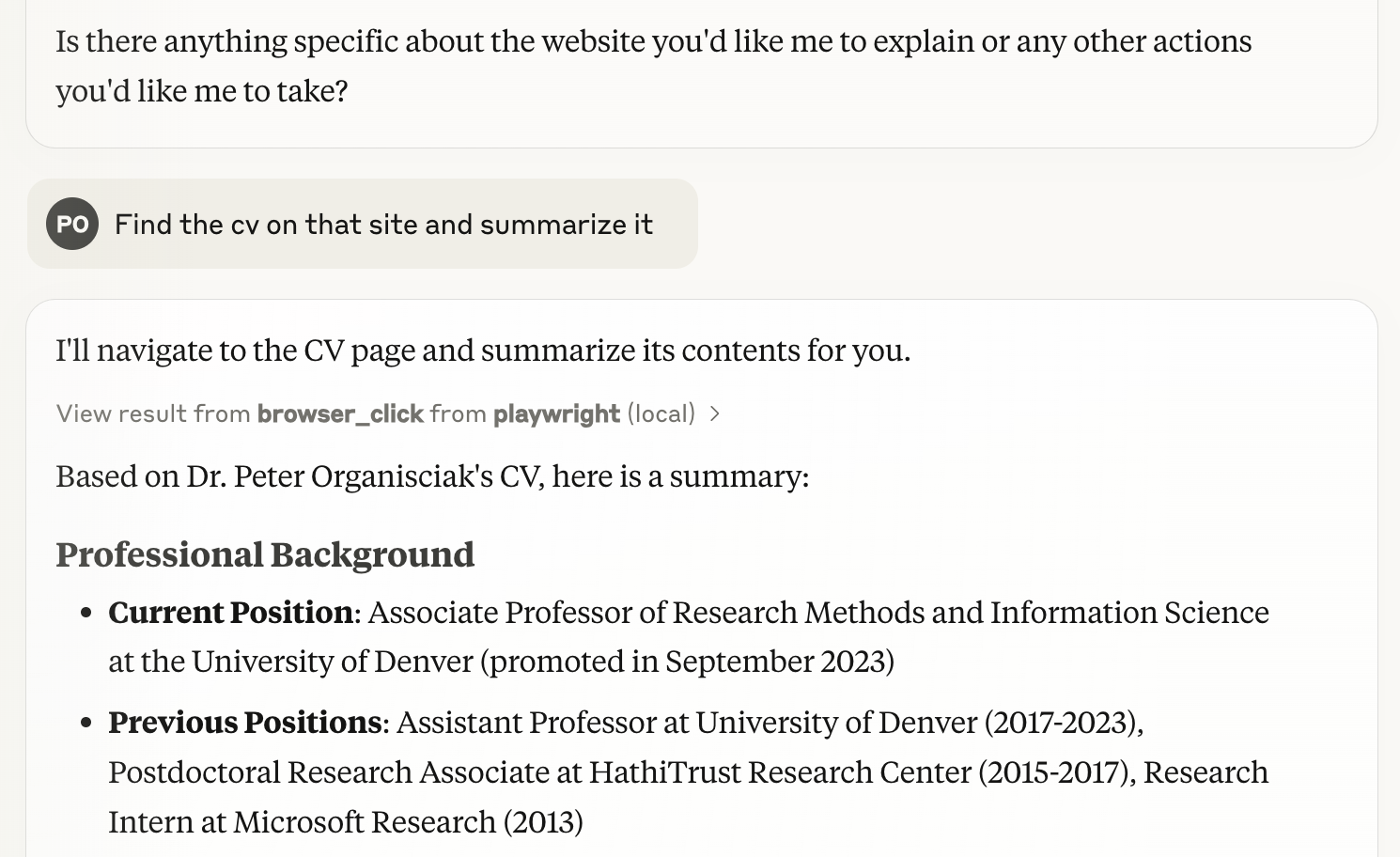
(Simon Willison summarizes the tool and how to use it in Claude: https://simonwillison.net/2025/Mar/25/playwright-mcp/)